project-image

GAMR - Active Gaming Play Pad

Created by GAMR

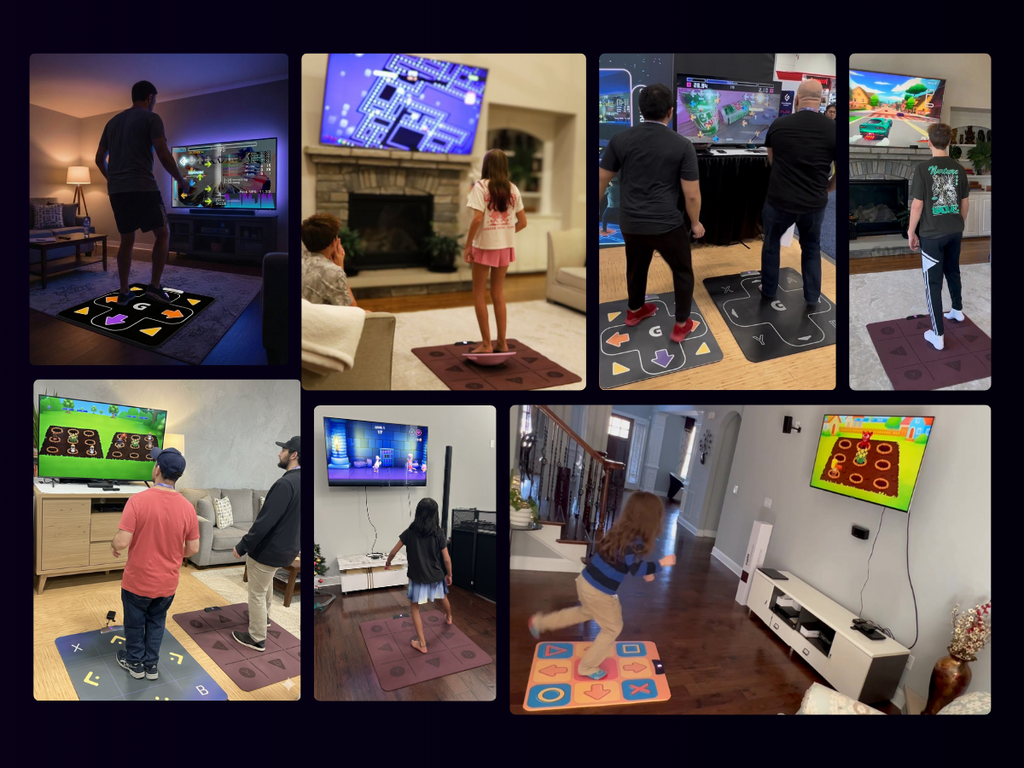
A Next-Gen Play Pad for Active Gaming and DDR-style Rhythm Games

Latest Updates from Our Project:

Collaboration Requests from the Community!
about 1 month ago – Sat, Mar 14, 2026 at 03:49:29 AM

Dear All,

Over the past few weeks, many of you from the DDR and active gaming community have reached out to us with interest in collaborating in different ways — whether it’s product testing, gameplay demos, influencer promotions, community events, or other exciting ideas.

First of all, thank you for the enthusiasm and support. It means a lot to see so many passionate people wanting to be part of the GAMR journey.

We want you to know that we are making note of all these requests. If we haven’t responded individually yet, please don’t feel that your message has been overlooked.

Right now, our entire team is fully focused on managing the final days of the Kickstarter campaign and preparing for the post-campaign steps, including surveys, logistics, and production planning.

Once the campaign concludes and we complete the Kickstarter-related work, we will have more time to properly review these opportunities and we will reach out to you individually to explore how we can collaborate.

We’re genuinely excited about working with many of you from the DDR and active gaming community, and we look forward to connecting with you soon.

Thank you again for your support and interest in GAMR — we truly appreciate it.

Warm Regards,

Team GAMR


How to select the add-ons?
about 1 month ago – Fri, Mar 13, 2026 at 08:33:55 PM

Dear All,

While many of you were able to add the add-ons successfully, we’re receiving emails and messages from a few backers who are unable to see or add them. Since it’s difficult for us to understand every individual scenario, we tested a few situations on our end, and the following steps consistently worked. We’re sharing them here for everyone’s convenience.


Please follow the steps below:

On Laptop/Desktop:

Step 1: Log in to Kickstarter, go to your pledge, and click “Manage your pledge”

Step 2: On the next page, click “Change your pledge.”

Step 3: Click “Continue.”

You should then be able to see the available add-ons.

On Mobile App:

Step 1: Log in to Kickstarter, go to your pledge, and tap “Manage.”

Step 2: On the next page, tap the three dots at the top and select “Edit pledge.”

Step 3: Tap “Continue.”

You should then be able to see the add-ons.

If you still can’t see them, no worries — you’ll also have the option to add any add-ons later through the post-campaign survey that we’ll send at the end of the campaign. We’ll make sure everyone who faced any issues during the campaign still has the opportunity to add what they need, and we’ll take care of fulfilling those requests.

Best Regards,

Team GAMR

BIG UPDATE: PS2 Support, VR Compatibility & Wired Mode DDR Testing
about 1 month ago – Thu, Mar 12, 2026 at 05:58:19 AM

Dear Backers,

We’ve been absolutely overwhelmed by the incredible support GAMR has received so far. Seeing more and more people join the campaign and place their trust in what we are building has been both exciting and humbling for our entire team.

Your support motivated us to push ourselves even harder. We have been working tirelessly to implement some of the most requested features from the community. Today, we’re excited to share some major updates.

🎮 GAMR Now Works with PS2 (Yes, Really!)

One of the most requested features from the DDR community was PS2 compatibility so players could enjoy the original Konami DDR games.

We’re thrilled to say:

GAMR now works with PS2.

This took a fair amount of engineering effort, but we finally made it happen. We just completed testing in our lab using our PS2 adapter, and it is working great.

This means DDR enthusiasts can now play the original DDR titles on PS2 using the GAMR Play Pad.

We are uploading a demo video on the Kickstarter project page showing GAMR connected to a PS2 and running one of the classic games.

These adapters are being shipped out to the DDR testing team tomorrow, and we will soon share a full DDR gameplay demo using original songs. We will add this to add-ons soon after that.

🕶️ GAMR Now Works with VR Devices seamlessly

We have received numerous emails asking about VR compatibility.

Over the past few weeks, we took our VR Integration prototype further and made several improvements to ensure seamless integration with VR platforms.

We’re extremely happy to announce that GAMR Play Pad now works with VR devices, including:

Meta Quest

Apple Vision Pro

You can now play existing controller-supported VR games using GAMR.

Even more exciting — we are currently developing two brand-new VR games designed specifically for GAMR, which will be provided FREE to all backers, in addition to the 10 GAMR Original games already included.

Wired Mode DDR Testing

We’ve also been testing the wired connection mode extensively for rhythm gameplay.

Recently we had an advanced DDR player test the pad using charts comparable to Xepher, and it worked great.

Next, we’re bringing in an expert DDR player to perform a full Xepher run. We’ll be recording that gameplay and sharing the video on the Kickstarter page this weekend.

——

So far we deliberately postponed answering questions related to these features. Rather than making promises, we wanted to first build, test, and validate everything in our lab before announcing it and show these proofs before the campaign ends.

We’re extremely glad that everything came together just in time before the campaign ends.

The entire GAMR team feels incredibly energized seeing the community rally behind this project.

Your support pushed us to move faster, solve harder problems, and deliver more than what we initially planned.

We’re truly grateful to everyone who has backed the campaign and helped make this journey possible.

And we’re excited to keep building.

More updates coming soon.

Team GAMR